
How to Take Card Payments as an HVAC Tech (No Card Reader Needed)
You finish your job on site and it is time to get paid. The client comes to you and says, "Can I pay with a card?"
Now, if you send an invoice, you might have to wait a couple of days to a week for the payment. Being a solo HVAC contractor or a small crew changes the whole dynamic, and it could at times affect your next jobs.
In this article, I will briefly cover how to take card payments as an HVAC tech using the HVAC Pad app, with no card reader needed. Best of all, HVAC Pad adds 0% to any payment you take with the app. You are not charged, and your client is not charged. Your payment processor's normal fee still applies.
It is important to get paid on the spot. Why?
There is no chasing, texting or following up with clients once you have sent them the invoice. No chasing means no arguments, and you keep a good working relationship with your client. You also get the cash in hand the moment you finish your job, which helps you fund your work by paying for fuel, upgrading tools and sometimes getting spare parts for the next job.
These days, most homeowners, and especially offices, don't carry cash. They want to pull out a card and be able to pay on the spot.
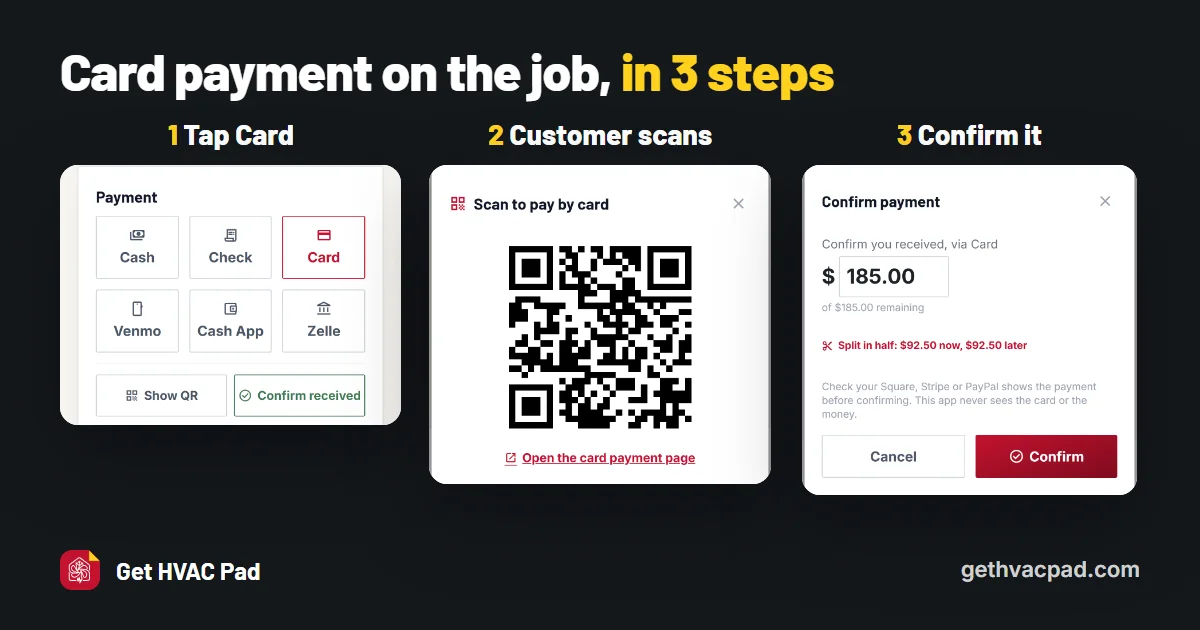
The HVAC Pad app enables QR code payments that allow HVAC contractors and small crews to get paid on the spot.
- When the job is done, the app shows you ways to get paid. Choose Card.
- It shows a QR code on your phone for the client to scan.
- The client scans the QR code and pays with their card through your own Square, Stripe or PayPal.
- You get paid into your Square, Stripe, PayPal, Venmo, Cash App or Zelle.
- You manually confirm the payment in your account on the spot, then tap Confirm in the HVAC Pad app.
If the client doesn't want to scan the QR code from your app, you can share a payment link, which opens on the client's own phone, and the client can pay from there.
Remember, you keep all the money you charged, minus any merchant fee from the services you or your client use. The HVAC Pad app is not in the middle and takes 0% of the payments.
Tip: Never mark a job paid until you see the payment land in your own processor app, your email or message. Your default payment receiving options never change, but they connect and embed in the HVAC Pad app, which helps you get paid on the spot.
If you are just starting as an HVAC contractor, or have just started using apps to make your HVAC life easier, you can use the free HVAC invoice template without signing up. When you are doing more than a few jobs a week and need more options that handle invoicing, client and job management, signatures and card payments in one place, give HVAC Pad a try. It is 30 days free.
New posts by email: subscribe on Substack